Crew
$49 per month, or 2 months free yearly
- 3 active projects
- 3 team seats
- Unlimited field signers
- OSHA JHAs and EM 385-1-1 AHAs
- Daily pre-task plans with crew sign-on
- Review and approval
Hazard analyses for construction crews
Pick the activity, tailor the steps, hazards and controls, and JHA Creator works out every risk code and fills the form in Word. Then route it for approval, brief the crew and collect their sign-off on site.
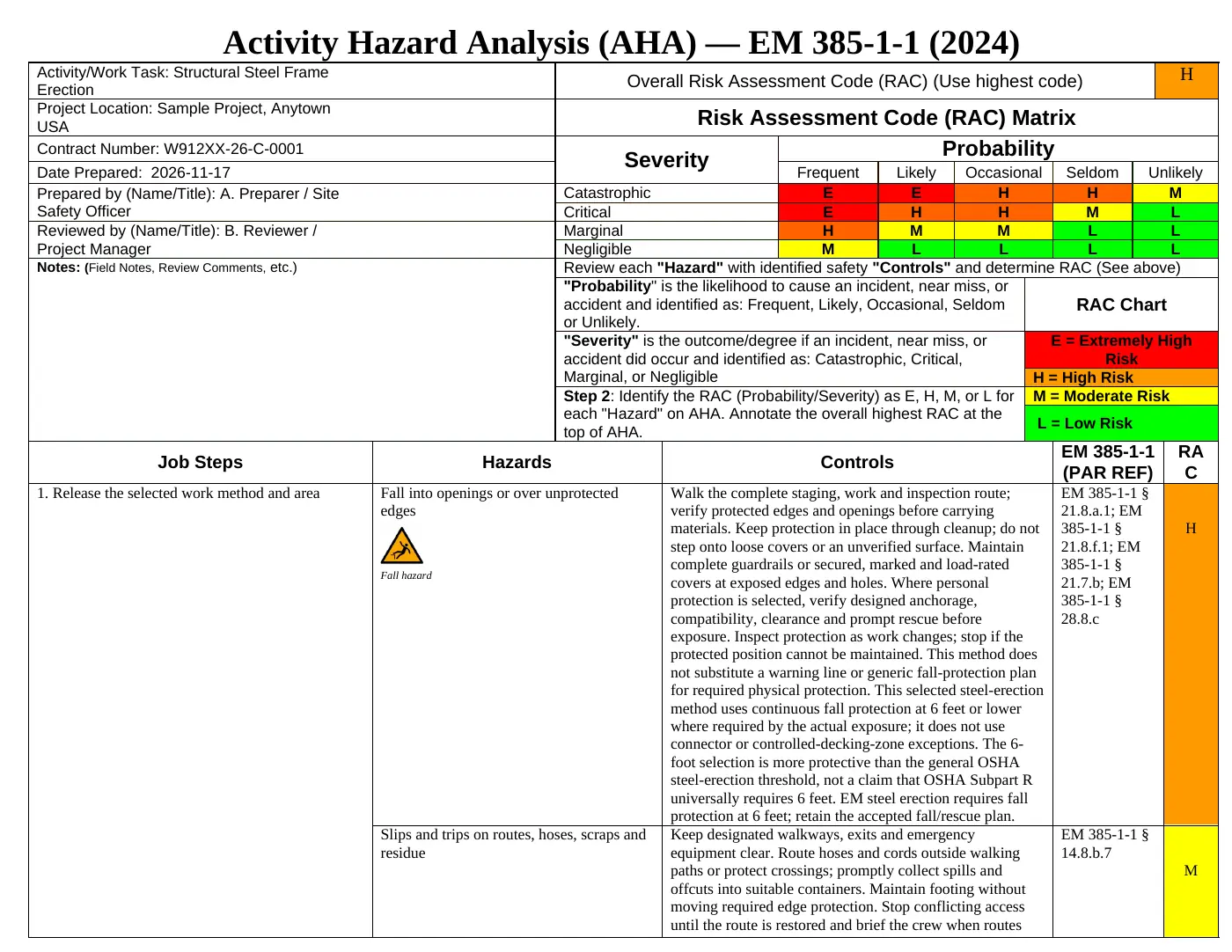
Overall RAC: HighCarried to the top of the form from the highest-rated hazard.
Built around the manuals your contract names
How it works
Start from an activity in the library, such as Steel Erection. Its job steps, hazards, controls and references come with it, including shared steps like mobilization, ladder use and housekeeping.
Add, remove and re-word steps, hazards and controls for this site. Rate each hazard's severity and probability and the RAC is set for you, with the highest carried to the top of the form.
Generate the Word document, send it to your approver, then brief the crew. Each worker signs an acknowledgment of the approved revision from their own phone.
AHA or JHA
Federal and commercial work ask for different paperwork about the same hazards. Build the activity once and generate whichever form the contract calls for.
| Aspect | AHA | JHA |
|---|---|---|
| Typical work | USACE and other federal contracts | Commercial and private projects |
| Governing manual | EM 385-1-1 | OSHA 29 CFR 1926 and 1910 |
| References column | EM 385-1-1 paragraphs | OSHA standards |
| Controls | Base controls plus any EM 385 extras | Base controls |
| Risk code | RAC per hazard and overall, on both standard forms | |
| Agency layout | Laid out like USACE ENG Form 6206 | OSHA’s own Job Hazard Analysis Template |
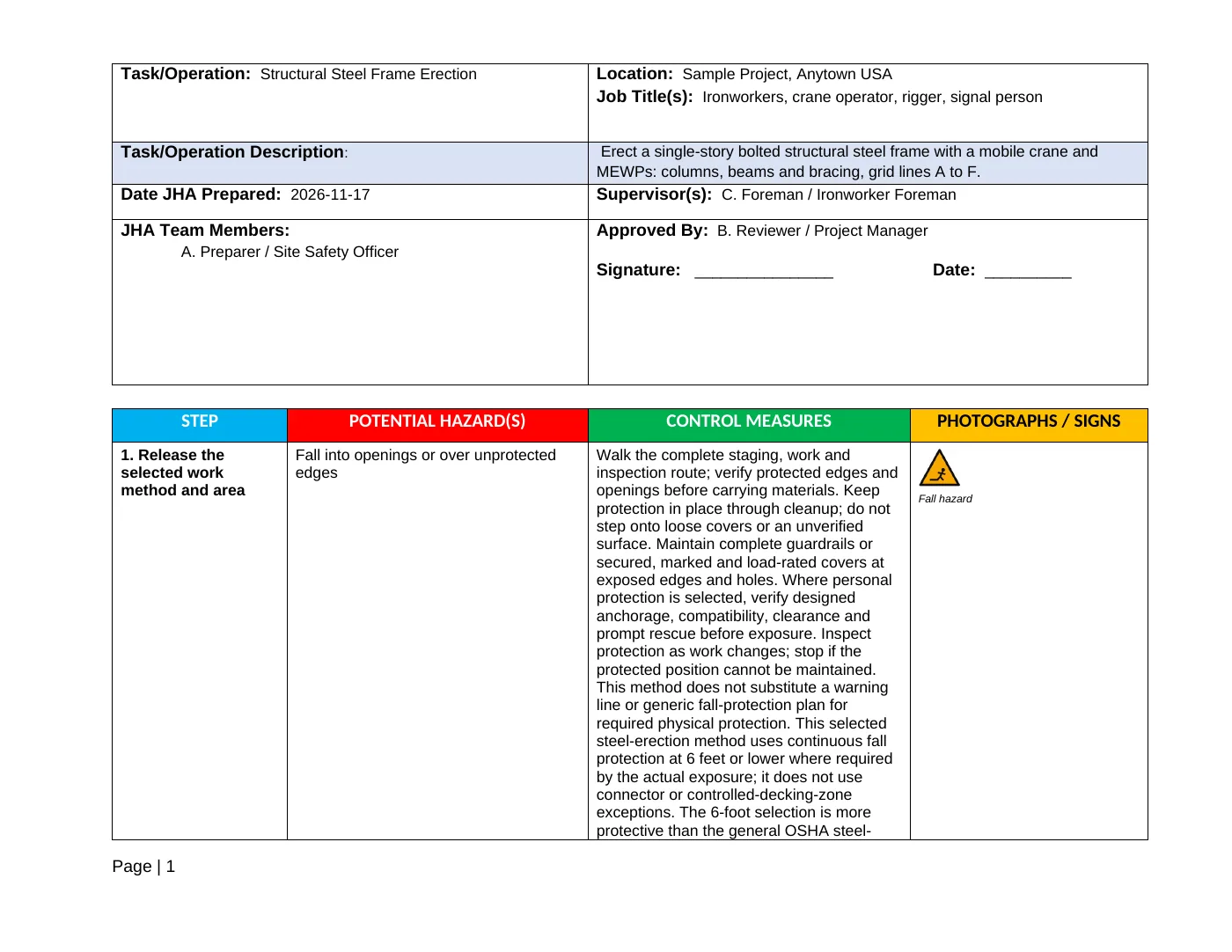
Asked for OSHA’s form by name? Choose it as the form layout and the same analysis prints on OSHA’s Word template, with your steps, hazards, controls and safety signs in its table. See the OSHA template layout
Severity and probability go in; the code comes out of the EM 385-1-1 matrix. A critical hazard that is likely, for example, is a H.
| Severity | Frequent | Likely | Occasional | Seldom | Unlikely |
|---|---|---|---|---|---|
| Catastrophic | E | E | H | H | M |
| Critical | E | H | H | M | L |
| Marginal | H | M | M | L | L |
| Negligible | M | L | L | L | L |
Activity library
Activities are built from reusable job steps, so a step written once (unloading at the laydown area, working from a ladder) reads the same on every analysis that uses it.
Start from ready-made activities such as Steel Erection and Cast-in-Place Concrete Placement, with shared steps for mobilization, ladder use and housekeeping. Add your company's own activities and hazard lines beside it, or import the analyses you already have.
Library text is where an analysis starts. Your competent person tailors it to the site, checks each reference and approves the revision before the crew is briefed.
In the field
A hazard analysis only protects people who have heard it. JHA Creator carries the approved revision out to the crew and brings proof back.
Authors submit; approvers approve or reject. Each approval is tied to one exact revision, so the crew is briefed on what was signed off.
The foreman opens the briefing and shows a QR code. Workers sign in on their own phones, confirm attendance and sign the acknowledgment with their name and an optional drawn mark.
The field app keeps attendance, signatures and concerns on the device and synchronises them when it reconnects. You can see what is still waiting to sync.
Anyone briefed can raise a question or concern. The foreman or approver assigns an action and records how it was resolved.
Records
When the safety manager, client or inspector asks what the crew was told, export one package per analysis.
Every plan starts with a 30-day free trial of the full product. Prices in US dollars.
$49 per month, or 2 months free yearly
Most popular
$149 per month, or 2 months free yearly
$249 per month, or 2 months free yearly
Custom pricing
An Activity Hazard Analysis (AHA) is the form EM 385-1-1 requires on USACE and many other federal projects, with a Risk Assessment Code for every hazard. A Job Hazard Analysis (JHA) is the commercial, OSHA-referenced equivalent. JHA Creator builds both from the same activity, so you can switch forms without re-writing the steps.
You choose the severity and probability for each hazard and JHA Creator looks up the code (E, H, M or L) from the EM 385-1-1 matrix. The highest code on the analysis is carried to the top of the form as the overall RAC. Codes are never typed by hand, so they can't drift from the ratings.
No. Treat every step, hazard, control, risk rating and reference in the library as a starting point. Your competent person tailors the analysis to the site, the crew and the equipment, checks each reference against the edition your contract names, and approves it before work starts. The analysis is your document, and you remain responsible for what it says and for the safety of the work. The Terms of Service set this out in full.
Both. Each analysis is generated as a .docx on the AHA or JHA form, so you can add your company's details or attach it to a submittal, and every approved revision also downloads as a PDF to share and print. An AHA can also be laid out like USACE ENG Form 6206, and a JHA can print on OSHA's own Job Hazard Analysis Template.
Yes. When you choose JHA, set the form layout to OSHA's Job Hazard Analysis Template. The document is built from the Word file OSHA publishes: its header block and its Step, Potential Hazards, Control Measures and Photographs table are kept, each hazard gets its own row, and the hazard's safety signs print in the photographs column. JHA Creator is independent software and is not affiliated with or endorsed by OSHA.
Yes. Import existing analyses, then review, approve and brief them in the same way as ones you build from the library.
The foreman opens a briefing and shares a QR code. Each worker signs in on their own phone, confirms attendance, signs an acknowledgment of the approved revision and can raise a question or concern. Records made without signal are kept on the device and synchronise when it reconnects.
A project you add in JHA Creator, until you close it. Closing keeps its analyses, sign-ons and records, and you can reopen it later. Jobs managed in YakProject don't count.
No. Crews and subcontractors sign briefings and analyses on their own phones without an account, on every plan. Seats are for the people who sign in to write, review and approve.
Yes. Every plan can be paid yearly for the price of ten months.
Your 30-day trial includes the full product and needs no card to start. We email you before it ends so you can choose a plan and add a payment method.
Enterprise plans include on-premise installation, including environments that need to meet CMMC requirements. Book a call and we'll scope it with you.
Build your first analysis from the library and generate the Word document in your trial.